Introduction
You have probably come across the phrase "garbage in, garbage out" when reading articles or books on machine learning. This phrase relates to the fact that data with a high quality is the key if you want to successfully develop a model which really adds value. That's where data preprocessing comes in, as it's a fundamental step in the machine learning lifecycle with a significant impact on model performance and efficiency.
In this three-part series, we'll take a look at the world of data preprocessing using scikit-learn pipelines. Part 1 explores the "why" and "how" of preprocessing, focusing on standard transformers and their limitations. Part 2 will explore more advanced techniques for handling categorical data and building custom transformers, while part 3 will introduce scikit-learn's ColumnTransformer, which is suitable for applying transformations to heterogeneous datasets (datasets with different data types).
Why do we even want to preprocess our data?
Clean and properly scaled data is critical to successfully training machine learning models - and here's why:
-
Missing or incorrect Values
Data collection isn't always perfect and you may come across missing or incorrect values. These missing and incorrect values can confuse your model and lead to inaccurate predictions. Preprocessing techniques such as imputation (filling in missing values) or deletion ensure that your data is valid and ready for model building. -
Different Scales
Imagine that one feature in your data represents income in dollars (from 0 to millions), and another represents age in years (0 to 100).. If you feed this directly into a model, the income feature will overwhelm the age feature due to its larger scale. This can cause the model to prioritise income over age, even though age may be a more important factor for your prediction. Preprocessing techniques such as scaling or normalization address this by putting all features on a similar scale.
In addition to these, there are other reasons to preprocess data, such as:
-
Encoding Categorical Features
Many models can't understand text labels directly. Preprocessing techniques such as one-hot encoding transform categorical features (such as "red", "blue", "green") into numerical representations that the model can work with. -
Handling Outliers
Extreme outliers can skew your model's predictions. Preprocessing techniques such as capping address these outliers without discarding valuable data points.
Enter the Pipeline: A Streamlined Approach with Scikit-learn
Scikit-learn describes a pipeline as follows:
A sequence of data transformers with an optional final predictor.In order to understand how a pipeline works and how you can utilize it, we will use a very simple script. I'll explain the different parts step by step to give you a good understanding of what's going on.
Pipeline allows you to sequentially apply a list of transformers to preprocess the data and, if desired, conclude the sequence with a final predictor for predictive modeling.
– Scikit-learn Pipeline
But first, let's have a quick look at the data we will be working with in this preprocessing series:

In this post, we will focus on the erroneous data in the yellow rectangles. The data points
highlighted in red are the ones we will be looking at in part two.
As you can see, we are only focusing on the numerical columns. The problem with these data
points is obvious: we have missing data, but we will find a way to fix this – with a simple
preprocessing
pipeline from scikit-learn's
Here is the code that we will discuss step by step to gain insight into a standard
preprocessing pipeline:
"""Script for preprocessing data"""

import numpy as np
import pandas as pd
from sklearn.impute import SimpleImputer
from sklearn.pipeline import Pipeline
from sklearn.preprocessing import MinMaxScaler

# Path to our raw data
DATA_PATH = "data/data.xlsx"

# Reading in data and converting the postal_code column as an integer
raw_data = pd.read_excel(DATA_PATH, converters={"postal_code": int})

# Selecting the columns in which missing values should be imputed
cols_to_impute = ["age", "experience_in_years", "salary_in_dollar"]

# Creating our Pipeline object with a SimpleImputer and MinMaxScaler from sklearn
pipeline = Pipeline([
    ("MeanImputer", SimpleImputer(missing_values=np.nan, strategy="mean")),
    ("MinMaxScaler", MinMaxScaler()),
])

# Coping our raw_data and imputing missing values with the column's mean
imputed_data = raw_data.copy()
imputed_data[cols_to_impute] = pipeline.fit_transform(raw_data[cols_to_impute])
Here's a step-by-step breakdown of the above (simple) pipeline for imputing missing values and scaling numeric features:
1. Import Necessary Libraries
import numpy as np
import pandas as pd
from sklearn.impute import SimpleImputer
from sklearn.pipeline import Pipeline
from sklearn.preprocessing import MinMaxScaler
2. Load and Prepare Data
DATA_PATH = "data/data.xlsx"
raw_data = pd.read_excel(DATA_PATH, converters={"postal_code": int})
- Replace
data/data.xlsx with the path to your actual data file. - The
converters parameter inpd.read_excel ensures thepostal_code column is read as integers.
3. Select Columns to Impute and Scale
cols_to_impute = ["age", "experience_in_years", "salary_in_dollar"]
4. Simple Imputation for Missing Values
pipeline = Pipeline([
("MeanImputer", SimpleImputer(missing_values=np.nan, strategy="mean")),
("MinMaxScaler", MinMaxScaler()),
])
Here it is: the construction of our

Important Note: While selecting columns within the pipeline might seem
convenient for this
example,
it is generally not recommended. This approach becomes inflexible when you have datasets with
varying column types. In the third part of this series we'll explore scikit-learn's
As you can see, the
In our case, we are using two transformations:
-
SimpleImputer
The simple imputer does what its name says: it imputes (missing) values based on a (simple) chosen strategy ("mean" ,"median" ,"most_frequent" ,"constant" ). In our case, the strategy is"mean" . This means that any missing values in the transformed column will be replaced by the mean of the corresponding column in which the missing value appears. I will not go into any further details and other imputers here as this would go beyond the scope of this article, but you can dig deeper in the scikit-learn documentation on imputing.
Themissing_values parameter,allows you to specify the format of the missing values, if you want to. Althoughmean andnp.nan are the default values forstrategy andmissing_values , I wanted to include them to show you that you can tweak theSimpleImputer to suit your needs. -
MinMaxScaler
Min-max scaling is a widely used scaling technique for scaling values in a fixed range between 0 and 1. The mathematical formula is as follows: $$x_{scaled} = \frac{x - X_{min}}{X_{max} - X_{min}}$$ x_scaled: The scaled value ranging between 0 and 1
x: The value which will be scaled
X_min: The minimum value of all X values in the column
X_max: The maximum value of all X values in the column
MinMaxScaler is only one of many scaling techniques available in scikit-learn. The choice of scaler depends on your specific data and the desired outcome.
5. Impute and Scale (on a copy)
imputed_data = raw_data.copy()
imputed_data[cols_to_impute] = pipeline.fit_transform(raw_data[cols_to_impute])
We create a copy of the raw data named
There you have it: your missing values are imputed
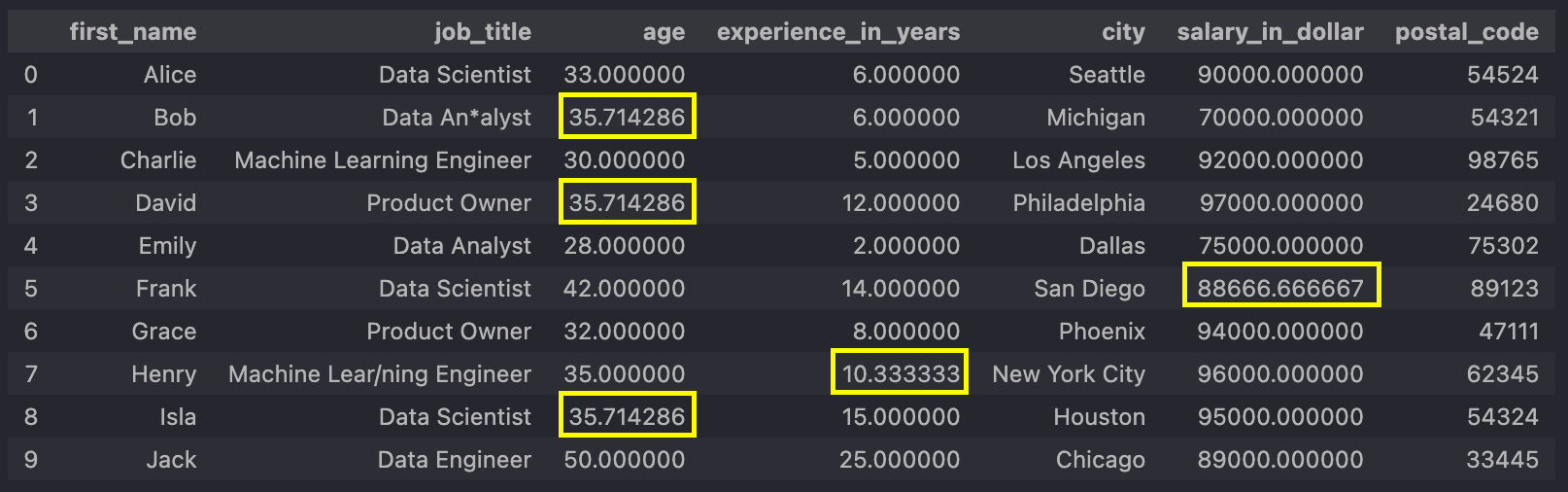 This screenshot has been added for
demonstration purposes.
Normally, you wouldn't see this intermediate step.
This screenshot has been added for
demonstration purposes.
Normally, you wouldn't see this intermediate step.
... and then scaled

As you can see, your transformations worked!
Details about fit, transform and fit_transform
Even if I have said that I won't go into any details regardingTo finally apply our pipeline to our data, we used the
Conclusion
Preprocessing pipelines in scikit-learn provide a structured and efficient way to prepare your
data for machine learning. By chaining preprocessing steps together, you can ensure consistency
and clarity in your data transformations. This first part lays the foundation for understanding
pipelines. In the next
part of this series, we'll take a look at more advanced techniques and
explore how to use function transformers and build custom transformers to solve more complex
data preprocessing challenges. In the third part, we'll also explore scikit-learn's