Introduction
Building on our understanding of data preprocessing with
the Scikit-learn
In this part of the series, we will look at transforming categorical data using scikit-learn's
Setting the Goals for Our Next Transformations
Speaking of data, let's take a look at our data after applying the transformations from part 1:
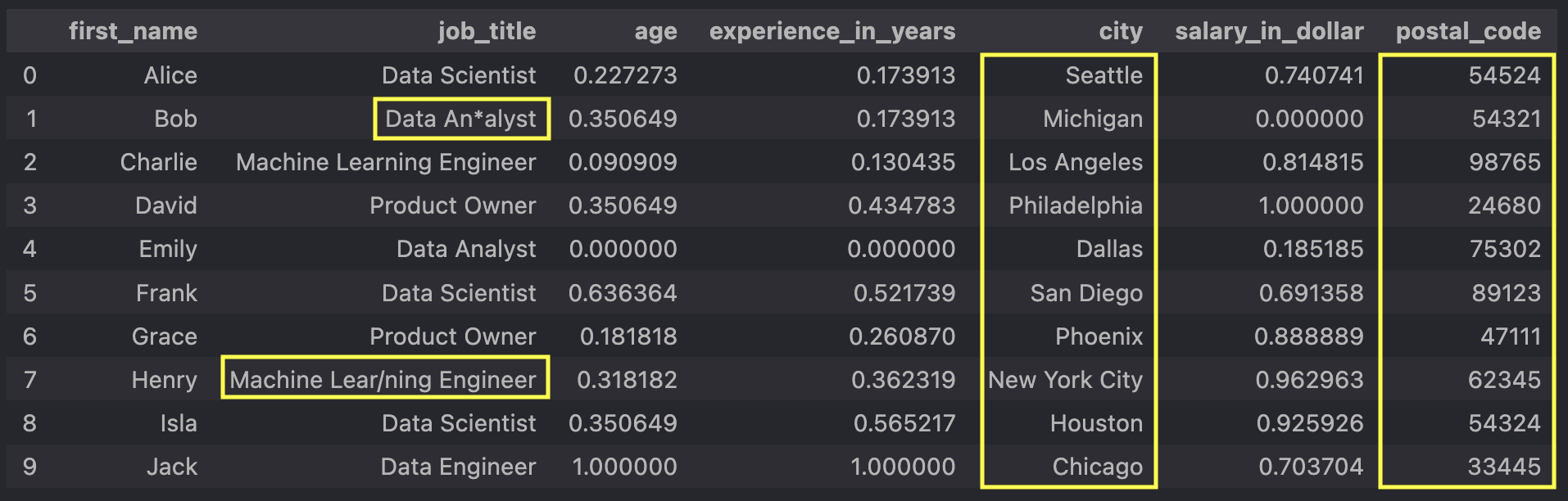
Our columns
However, the highlighted values in the columns
For example, models such as neural networks only work with numerical data, so we need to convert
our categorical
data, such as
However, before converting the strings to numbers and binning our postal codes, we must address
the special characters in the
So here are our preprocessing goals:
- Remove special characters from the
job_title column - Create bins and assign each postal code to a bin
- One-hot encode the
job_title ,city , andpostal_code_bin columns (created in the previous step)
Applying FunctionTransformer and Custom Transformer
To clean theUsing Scikit-learn's FunctionTransformer
Here is the complete script, some of which you may already know from the first part of this series:
"""Script for preprocessing data"""

import numpy as np
import pandas as pd
from sklearn.impute import SimpleImputer
from sklearn.pipeline import Pipeline
from sklearn.preprocessing import FunctionTransformer, MinMaxScaler

from preprocessing import (
    PostalCodeBinTransformer,
    one_hot_encode_columns,
    remove_special_chars,
)

# Path to our raw data
DATA_PATH = "data/data.xlsx"

# Reading in data and converting the postal_code column as an integer
raw_data = pd.read_excel(DATA_PATH, converters={"postal_code": int})

# Selecting the columns in which missing values should be imputed
cols_to_impute = ["age", "experience_in_years", "salary_in_dollar"]

# Creating our Pipeline object with a SimpleImputer and MinMaxScaler from sklearn
pipeline_num = Pipeline(
    [
        ("MeanImputer", SimpleImputer(missing_values=np.nan, strategy="mean")),
        ("MinMaxScaler", MinMaxScaler()),
    ]
)

# Creating our special_char_remover with scikit-learn's FunctionTransformer
special_char_remover = FunctionTransformer(
    remove_special_chars,
    kw_args={"column_name": "job_title"}
).set_output(transform="pandas")

# Name the columns which should be one hot encoded
columns_to_encode = ["job_title", "city", "postal_code_bin"]

# Creating our one hot encoding with scikit-learn's FunctionTransformer
one_hot_encoder = FunctionTransformer(
    one_hot_encode_columns,
    kw_args={"columns_to_encode": columns_to_encode},
)

# Creating our second Pipeline object with our
# custom preprocessing function and our CustomTransformers
pipeline_cat = Pipeline(
    [
        ("SpecialCharRemover", special_char_remover),
        ("PostalCodeBinner", PostalCodeBinTransformer()),
        ("OneHotEncoder", one_hot_encoder),
    ]
)

# Coping our raw_data and imputing missing values with the column's mean
imputed_data = raw_data.copy()
imputed_data[cols_to_impute] = pipeline_num.fit_transform(raw_data[cols_to_impute])

# Remove the special characters from the job_title column
# Add column postal_code_bin based on the postal_code column
# One-not encode the columns in the list columns_to_encode
cleaned_data = pipeline_cat.fit_transform(imputed_data)
And here is the code from our imported functions and our custom transfomer from the
import numpy as np
import pandas as pd
from sklearn.base import BaseEstimator, TransformerMixin


def remove_special_chars(df: pd.DataFrame, column_name: str) -> pd.DataFrame:
    """
    Removes special characters from a column.

    Parameters
    ----------
    df : pd.DataFrame
        The DataFrame containing the column to be cleaned.
    col_name : str
        The name of the column which values should be cleaned from special characters.

    Returns
    -------
    pd.DataFrame
        The DataFrame where the specified column values are cleaned from special characters.
    """
    # Define pattern for special characters
    pattern = r"[\*\/!_\-.,;?$%&$\^°]"
    df[column_name] = df[column_name].str.replace(pattern, "", regex=True)
    return df


def one_hot_encode_columns(df: pd.DataFrame, columns_to_encode: list[str])
-> pd.DataFrame:
    """
    One-hot encodes specified categorical columns in a DataFrame.

    Parameters
    ----------
    df: pd.DataFrame or np.ndarray
        The input DataFrame or array containing categorical columns to be
        one-hot encoded.

    columns_to_encode : list[str]
        A list of column names in the DataFrame to be one-hot encoded.

    Returns
    -------
    pd.DataFrame or np.ndarray
        DataFrame or array with one-hot encoded columns.
    """
    if isinstance(df, pd.DataFrame):
        encoded_df = pd.get_dummies(df, columns=columns_to_encode)
        return encoded_df
    elif isinstance(df, np.ndarray):
        raise ValueError("Input must be a DataFrame for one-hot encoding.")
    else:
        raise TypeError("Unsupported input type. Expected DataFrame or numpy array.")


class PostalCodeBinTransformer(BaseEstimator, TransformerMixin):
    def __init__(self):
    self.bins = [
        0, 10000, 20000, 30000, 40000,
        50000, 60000, 70000, 80000, 90000, 100000,
    ]
    self.labels = [
        "0-10000", "10000-20000", "20000-30000", "30000-40000",
        "40000-50000", "50000-60000", "60000-70000", "70000-80000",
        "80000-90000", "90000-100000",
    ]

    def fit(self, X: pd.DataFrame):
        return self

    def transform(self, X: pd.DataFrame) -> pd.DataFrame:
        postal_codes = X["postal_code"].astype(int)
        X["postal_code_bin"] = pd.cut(postal_codes,
                                      bins=self.bins,
                                      labels=self.labels
                                )
        return X
The following step-by-step explanation will focus on how we use scikit-learn's
Imputing and Scaling Numerical Data
"""Script for preprocessing data"""

import numpy as np
import pandas as pd
from sklearn.impute import SimpleImputer
from sklearn.pipeline import Pipeline
from sklearn.preprocessing import FunctionTransformer, MinMaxScaler

from preprocessing import remove_special_chars

# Path to our raw data
DATA_PATH = "data/data.xlsx"

# Reading in data and converting the postal_code column as an integer
raw_data = pd.read_excel(DATA_PATH, converters={"postal_code": int})

# Selecting the columns in which missing values should be imputed
cols_to_impute = ["age", "experience_in_years", "salary_in_dollar"]

# Creating our Pipeline object with a SimpleImputer and MinMaxScaler from sklearn
pipeline_num = Pipeline(
    [
        ("MeanImputer", SimpleImputer(missing_values=np.nan, strategy="mean")),
        ("MinMaxScaler", MinMaxScaler()),
    ]
)
The first part of the script preprocesses the numeric data. It imputes missing
values in the
Transforming our Functions with Scikit-learn's FunctionTransformer
# Selecting the column from which special characters should be removed
special_char_remover = FunctionTransformer(
    remove_special_chars,
    kw_args={"column_name": "job_title"}
).set_output(transform="pandas")In summary, this code creates a resuable transformer based on a custom function that can easily be included in a scikit-learn pipeline to clean special characters from a specific column.
# Name the columns which should be one hot encoded
columns_to_encode = ["job_title", "city", "postal_code_bin"]

# Creating our one hot encoding with scikit-learn's FunctionTransformer
one_hot_encoder = FunctionTransformer(
    one_hot_encode_columns,
    kw_args={"columns_to_encode": columns_to_encode},
)
Building the Categorical Data Preprocessing Pipeline
Let's now move on to creating the second pipeline that handles the categorical data. This
pipeline contains our custom preprocessing functions and transformers to ensure that our
categorical data is effectively cleaned, binned and one-hot encoded.
Here is the code to
create this pipeline:
# Creating our second Pipeline object with our custom preprocessing function
# and our CustomTransformers
pipeline_cat = Pipeline(
    [
        ("SpecialCharRemover", special_char_remover),
        ("PostalCodeBinner", PostalCodeBinTransformer()),
        ("OneHotEncoder", one_hot_encoder),
    ]
)
1. Removing Special Characters from the job_title column
("SpecialCharRemover", special_char_remover)
This step uses our transformer
2. Creating Bins for Postal Codes
("PostalCodeBinner", PostalCodeBinTransformer())
This custom transformer,
class PostalCodeBinTransformer(BaseEstimator, TransformerMixin):
    def __init__(self):
        self.bins = [
            0, 10000, 20000, 30000, 40000,
            50000, 60000, 70000, 80000, 90000, 100000,
        ]
        self.labels = [
            "0-10000", "10000-20000", "20000-30000", "30000-40000",
            "40000-50000", "50000-60000", "60000-70000", "70000-80000",
            "80000-90000", "90000-100000",
        ]

    def fit(self, X: pd.DataFrame):
        return self

    def transform(self, X: pd.DataFrame) -> pd.DataFrame:
        postal_codes = X["postal_code"].astype(int)
        X["postal_code_bin"] = pd.cut(postal_codes,
                                      bins=self.bins,
                                      labels=self.labels
                               )
        return X
In the context of creating custom transformers in scikit-learn, having both a
Initialization (__init__ method)
The
Fitting (
The
Even though the
Transformation (
The
In the
- Conversion to integer: The postal codes are converted to integers to ensure they can be properly binned.
-
Binning: The
pd.cut function is used to bin the postal codes into the specified ranges (bins). - Adding a new column: A new column,
postal_code_bin , is added to the DataFrame to store the bin labels.
By defining both the
3. One-Hot Encoding Categorical Columns
("OneHotEncoder", one_hot_encoder)This step uses our custom transformer
Applying the Pipeline
After defining the pipeline, we can apply it to our data to preprocess it:
# Copying our raw_data and imputing missing values with the column's mean
imputed_data = raw_data.copy()
imputed_data[cols_to_impute] = pipeline_num.fit_transform(raw_data[cols_to_impute])

# Remove the special characters from the job_title column
# Add column postal_code_bin based on the postal_code column
# One-not encode the columns in the list columns_to_encode
cleaned_data = pipeline_cat.fit_transform(imputed_data)
We first create a copy of the raw data and then apply the numerical data preprocessing
pipeline (
Next, we apply the categorical data preprocessing pipeline (
To get a better understanding of what happens before one-hot encoding, here is an
intermediate state of the data showing the state before one-hot encoding:
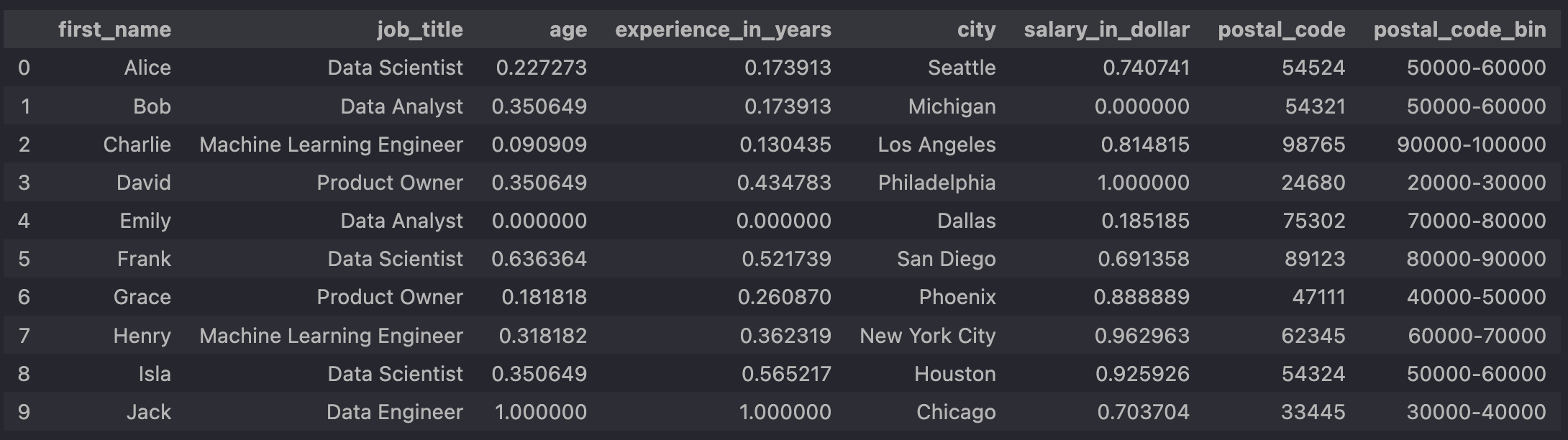
-
the column
job_title no longer contains any special characters - an additional column
postal_code_bin has been added, which we can use for our one-hot encoding in the next step
After running our code and looking at our transformed data, everything looks fine:

As the one-hot-encoded columns for the job titles and statuses are not visible in the screenshot above, here are two more screenshots for the sake of completeness:
 One-hot-encoded values of the job_title column.
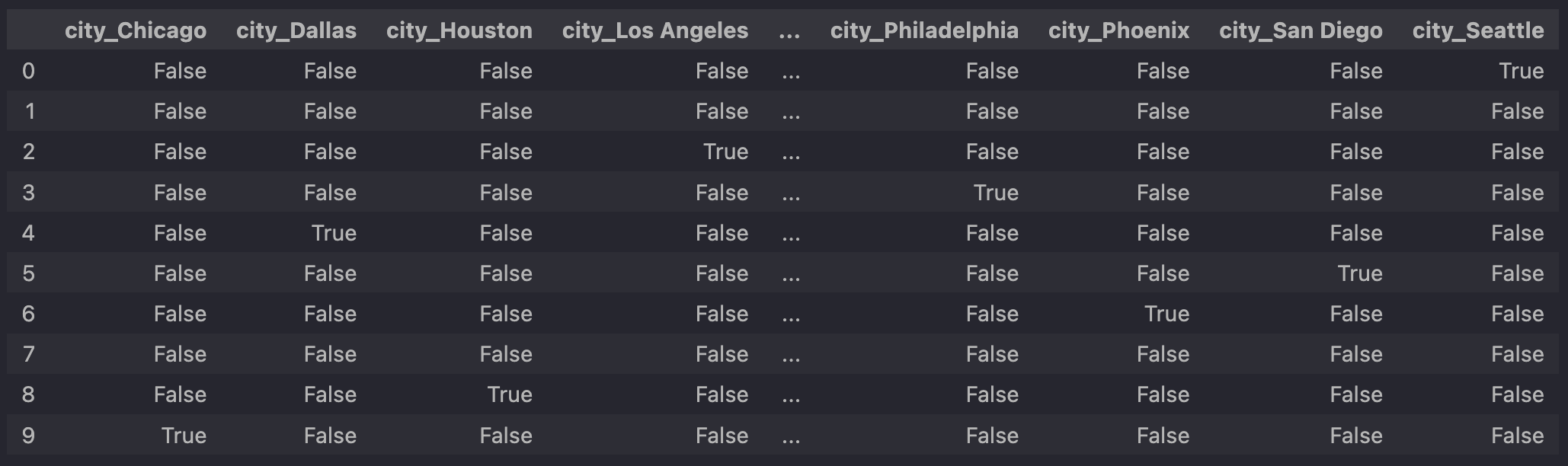 One-hot-encoded values of the city column.
By integrating these preprocessing steps into a single pipeline, we streamline the data cleaning and transformation process, making it more efficient and less prone to error. This setup also ensures that our data is consistently processed in the same way every time, which is critical for reproducible and reliable machine learning workflows.
Conclusion
In this part of the series, we have extended our preprocessing pipeline to handle categorical
data by removing special characters, binning postal codes, and applying one-hot encoding.
These steps are crucial for preparing data for machine learning models, such as neural
networks, which require numerical input. Stay tuned for the third and final part of
this series, where we will introduce scikit-learn's